Studies show you can lose up to 76 workdays a year to distractions, and your home office layout often drives that. You’ll get more focus by placing your desk perpendicular to the window, then layering task and ambient lighting to flatten glare on screens. You can define work and reset zones with a low-pile rug, matte finishes, and a tight, neutral palette with one warm accent. Next, you’ll want to tackle the one change that hides clutter fast…
Key Takeaways
- Identify pain points like clutter, narrow pathways, noise, glare, and uncomfortable furniture, then prioritize fixes that remove daily friction.
- Reposition the desk perpendicular to the window, keep the monitor back toward daylight, and use low-sheen surfaces to reduce glare.
- Layer lighting with a 3500–4000K task lamp, soft ambient light behind you, and a diffused key light above eye level for video calls.
- Make quick ergonomic upgrades: monitor at eye level, keyboard and mouse close, feet flat, plus a riser and supportive desk pad.
- Create clear zones for work and relaxation, maintain a 30–36 inch walkway, and use closed storage and cable management for calmer visuals.
List Your Top Home Office Pain Points

Before you shop for a new chair or pick a fresh paint color, pinpoint what’s not working in your current setup. Walk the room and note pinch points: a tight path behind your chair, cluttered surfaces, or storage that forces you to stand and search. Track when you lose focus and why; office noise from hallways, appliances, or calls may demand better zoning, a rug, or upholstered panels.
For distraction management, list visual triggers like open shelving, bright screens in your peripheral view, or messy cords. Flag comfort issues tied to materials: a slippery desk top, a squeaky task chair, or harsh laminate glare.
Finally, map color problems—too much contrast, dull walls, or busy patterns—that fatigue your eyes.
Place Your Desk for Daylight and No Glare
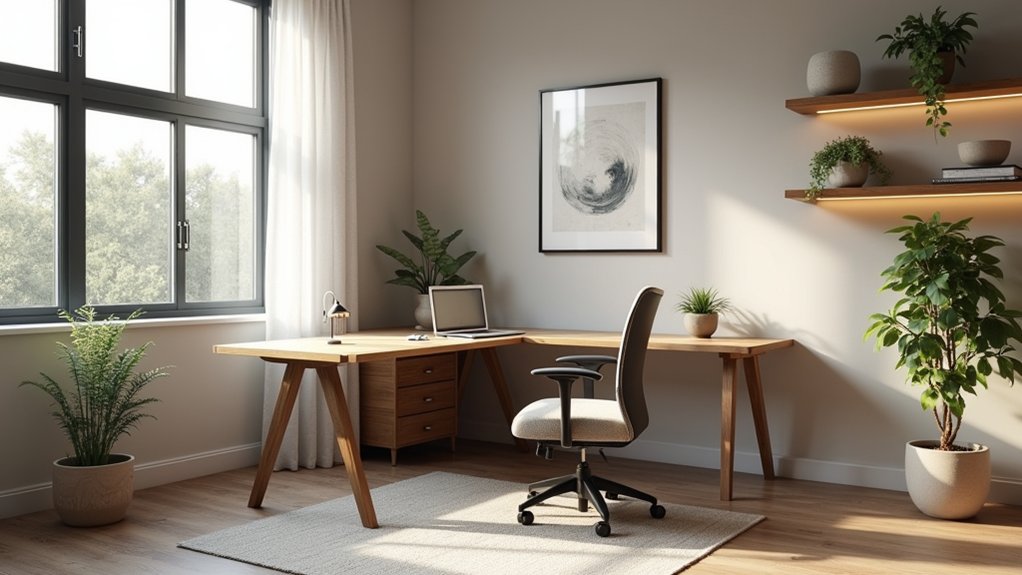
If you position your desk to capture daylight without inviting glare, you’ll boost focus and make your finishes look intentional. Start by placing the desktop perpendicular to the window, so natural light washes the room while your screen stays out of the brightest beam. Keep the monitor’s back toward the window rather than facing it, and angle it slightly to fine-tune glare control.
Then plan the backdrop: put the desk where the wall color reads true in daytime—soft warm whites, muted greens, or clay tones pair well with oak, walnut, and matte black hardware. Choose a low-sheen desktop, a textured blotter, and linen or wool drapery to diffuse reflections. Add a light rug to bounce daylight deeper into the plan.
Improve Home Office Lighting for Work and Video
Daylight sets a strong baseline, but layered lighting keeps your work surface consistent and makes you look polished on video from morning through evening.
Add task lighting at your dominant-hand side, aimed across the desktop to reduce shadows on paper and keyboards. Choose a neutral color temperature around 3500–4000K for focused work that won’t skew wood tones or make white walls look gray.
Balance it with a soft ambient source behind you—like a shaded floor lamp—to lift the room’s corners and prevent a cave effect.
For video, place a diffused key light slightly above eye level, centered, so your face reads evenly against darker shelving or art. Match bulb finishes and metals to your hardware for a cohesive, intentional palette.
Fix Home Office Ergonomics in 15 Minutes
While you don’t need new furniture to feel better at your desk, a 15-minute ergonomics reset can make your setup look cleaner and work harder. Start by centering your chair with the desk so your monitor frames you like a picture: top edge at eye level, screen an arm’s length away.
Make quick posture adjustments—feet flat, hips slightly higher than knees, shoulders relaxed. Slide your keyboard close and keep your mouse on the same plane to reduce reach.
Add ergonomic accessories that also refine the palette: a matte-black monitor riser, a cork wrist rest, or a felt desk pad that softens glare and quiets clatter.
Tuck cables with matching clips, then align materials—wood, metal, fabric—for a calmer, coordinated workspace.
Create Zones and Clear Your Walking Path

Because a home office does double duty, you’ll get a faster refresh by zoning the room and reclaiming a clean walking line from the door to your chair. Pull the desk into a “work zone” with a rug that’s low-pile and easy to roll on, then keep 30–36 inches of clear floor as your main path.
Angle a guest chair or reading nook into a “pause zone” so it doesn’t interrupt circulation. Use color schemes to separate areas: cooler tones at the desk for focus, warmer neutrals in the lounge corner.
Repeat materials—oak, black metal, or linen—across zones to unify the layout. Finish with decorative accents like a matte ceramic lamp or framed print placed outside the path.
Add Smart Home Office Storage That Hides Clutter
You can keep your home office looking calm by choosing concealed cabinet solutions that match your wall color and use matte wood or lacquer fronts to visually recede.
Place them along the least-used wall or under a window line so they don’t interrupt circulation, then hide cables, paper, and supplies behind clean, flush doors.
Add multifunctional storage furniture—like a desk with integrated drawers or an ottoman in performance fabric—to stash clutter while keeping the palette and materials cohesive.
Concealed Cabinet Solutions
If your desk surface keeps disappearing under cables, paper stacks, and chargers, concealed cabinet solutions restore visual calm without shrinking your workflow. Plan a shallow run of uppers above the desk line, then anchor it with a low credenza so you keep sightlines open and circulation clear.
Choose seamless cabinetry with touch-latch doors to avoid handles snagging sleeves in tight layouts. Inside, add hidden compartments for routers, power strips, and backup drives, and route cords through grommeted panels.
Coordinate finishes: match warm oak fronts to a walnut desktop, or use matte white to bounce light and quiet contrast. Pick durable materials—laminate interiors for easy wipe-downs, veneer or painted MDF exteriors for clean edges—and align door reveals for a tailored grid.
Multifunctional Storage Furniture
When every square foot has to earn its keep, multifunctional storage furniture tucks away daily clutter while sharpening the room’s layout. Choose a desk with drawers and Hidden compartments for chargers, pens, and a laptop stand, so your work surface stays visually quiet.
Add an ottoman that opens for files or a bench with cubbies to anchor a floating corner workstation and define circulation paths.
Use modular shelving to build upward, not outward, keeping frequently used items at eye level and archives higher. Match finishes to your palette: pale oak warms cool walls, matte black steel crisps up neutrals, and white lacquer bounces light.
Mix closed fronts with open niches so décor reads intentional, not messy. Keep cables routed behind panels for a cleaner line.
Choose Decor That Looks Good and Works Hard

Although a home office needs to look polished, every decor choice should earn its footprint by adding function and cohesion. Start with a tight palette—two neutrals plus one accent—and repeat it across textiles, art, and accessories for aesthetic balance.
Choose a desk lamp with adjustable arms, warm LEDs, and a matte finish that reduces glare while matching your hardware. Add an area rug to zone the work surface, dampen sound, and anchor furniture; pick low-pile wool or performance fiber for Decor durability.
Use a pinboard or rail system in the same metal tone as your shelves to corral notes and tools. Finish with a single, weighty planter or sculptural bookend to stabilize lines and prevent visual drift.
Set Up a Clean, Camera-Ready Office Background
A tight palette and hard-working decor set the stage—now aim that same discipline at what the camera sees. Place your desk so the lens faces a calm wall, not a doorway or cluttered shelf. Keep the background shallow: one closed cabinet, one slim bookcase, or a tidy credenza reads intentional. Match finishes—matte paint, light oak, black metal—so edges don’t compete.
Lock in your color palette with two neutrals and one muted accent, then repeat it in textiles and storage boxes. Swap glossy frames for satin or wood to cut glare. Use decorative accents sparingly: a single plant, one sculptural lamp, and a small art piece centered at eye level. Hide cords, and keep papers in lidded bins off-camera.
Frequently Asked Questions
How Can I Soundproof My Home Office for Calls and Focus?
Like a calm harbor, you’ll soundproof your home office by zoning your desk away from doors, adding acoustic panels in matching neutrals, and hanging soundproof curtains in dense fabric; layer rugs, seal gaps, and choose soft materials.
What’s the Best Way to Manage Cables and Hide Power Strips?
Start with Cable management: mount a slim under-desk tray, route cords in color-matched sleeves, and label ends. For Power strip concealment, use a wood-grain cable box, anchor it behind legs, and secure with clips.
How Do I Choose a Quiet, Reliable Printer Setup for Home Use?
You’ll get a quiet, reliable setup by choosing a laser printer; it’s often 5–10 dB quieter than inkjets. Prioritize easy printer maintenance, smart ink cartridge selection, and place it on a matte, dampening shelf.
Which Plants Are Safest for Pets in a Home Office?
You’ll keep pets safest with spider plants, Boston ferns, areca palms, and calatheas—Pet friendly greenery and Safe indoor plants. Place them in ceramic pots, pair with muted greens, and avoid lilies, pothos.
How Can I Improve Wi‑Fi Strength and Connectivity in My Office?
Like sunlight through sheer linen, boost your signal with Wireless optimization and smart Router placement: center it high on wood, away from metal; switch to 5GHz; add a mesh node; tidy cables; update firmware.
About the Author